David Cordero
Beneath React Native on Vega
Published on 31 Oct 2026
Amazon is very clear about how to build Apps for their new Vega OS, the Linux-based system behind the latest Fire TV devices: you use React Native. The documentation, the templates and the tooling all point to it. As far as Amazon is concerned, React Native is the only way.
Having worked on very restrictive ecosystems for many years, I know that “the only way” usually means “the only supported way”. So I decided to find out whether an app, with no JavaScript at all, could actually run on Vega.
Spoiler: it can, and this post covers my journey to get there.
How React Native works on Vega
Before getting into the experiment, it helps to know what sits under a React Native app on Vega.
Your React components run in JavaScript, on the Hermes engine. React Native turns those components into a tree of native views. On iOS those would be UIViews, on Android Views, and on Vega they are views from the Vega UI Toolkit.
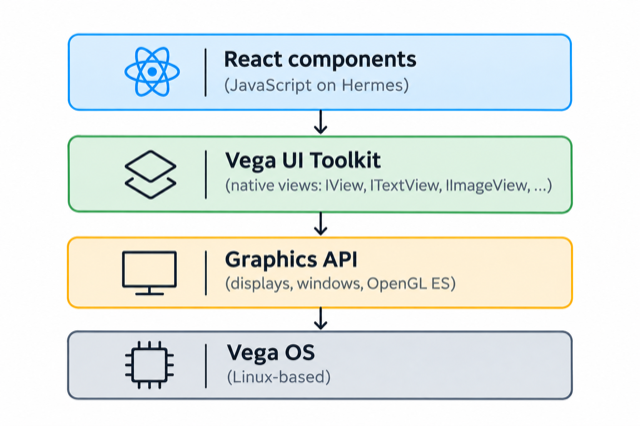
The Vega UI Toolkit is a C++ UI framework that ships with the OS. It has the classic building blocks you would expect: IView, ITextView, IImageView, layers, a canvas, focus handling, animations, and so on. Amazon even lets you write your own native components on top of it, but always mounted inside a React Native app.
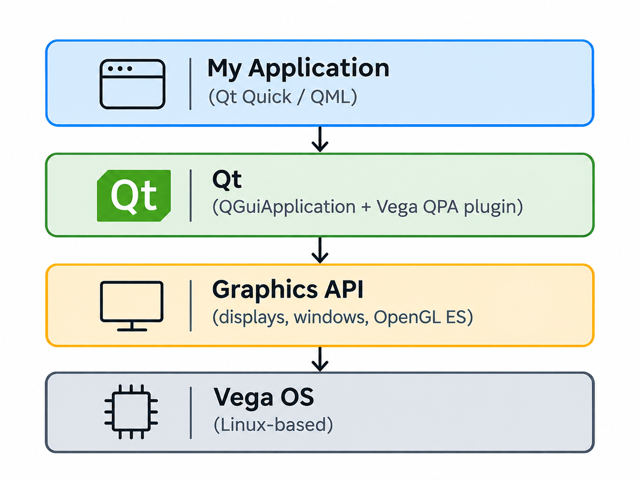
Below the UI Toolkit there is one more layer, a low-level graphics API that gives you displays, windows and OpenGL ES surfaces. The UI Toolkit draws on top of that layer, and React Native drives the UI Toolkit.
So the question was simple: what happens if we remove the top two layers?
The experiment: No React Native, no UI Toolkit
Reading through the interface definitions that ship with the Vega SDK, I found two things that made this experiment possible.
The first one is an app model. A Vega app is made of components, and the system’s Lifecycle Manager starts them and drives them through onStart, onForeground, onBackground and onStop.
A React Native app is just one of those components, launched through a React Native runtime declared in its manifest.
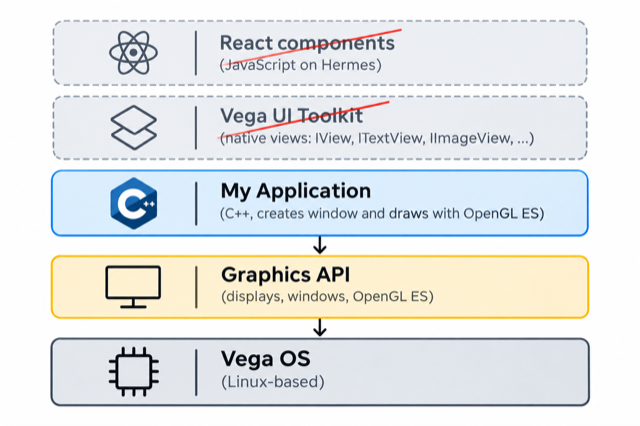
The second one is the low-level graphics API I mentioned before. It is meant for things like games and video, and it gives you everything you need to put pixels on the screen: a display controller, a window, a GPU device and an OpenGL ES surface.
So the plan was to write the component by myself, in C++, and draw it on screen without any of the layers above.
The entry point
The first step is the manifest. Instead of pointing the interactive component to the React Native runtime, I simply left that line out:
[[components.interactive]]
id = "me.dcordero.nativevega.main"
launch-type = "singleton"
categories = ["com.amazon.category.main"]
Without a runtime, the system looks inside your app’s library for an entry point with a fixed name, /<package id>.entry_point_factory, as described in the app model guide that ships with the SDK. It asks that entry point to create your app’s component, and from then on, the system calls your C++ code directly when the app starts, goes to the foreground or background, and stops.
struct MainComponent : ApmfBase<MainComponent, IInteractiveComponent> {
    void onForeground(View<IComponentInstance> instance) {
        renderer_ = std::make_unique<Renderer>(instance);
        renderer_->start();  // own thread, callbacks must return quickly
    }
    // onStart, onBackground, onStop, ...
};
There is one important rule here. After onForeground, the app has to create a window soon, or the system kills it for breaking its lifecycle contract. That is our cue to start drawing.
Putting pixels on the screen
Drawing follows the same steps as any OpenGL ES app on embedded Linux, just with Amazon’s names on them: create a display controller for your app instance, create a full-screen window, create a GPU device, a context and a surface for that window, and run a render loop of prepare, draw, end and present.
Sadly, the Vega SDK does not include any OpenGL ES headers or libraries. Fortunately, the GPU device can resolve function pointers at runtime, the same way eglGetProcAddress does. With a handful of function declarations and a fallback to dlopen, I had OpenGL ES working without linking against anything.
To keep the experiment minimal I did not even write a shader. The whole UI is a grid of tiles drawn with scissor and clear calls, a highlight you can move with the D-pad, and a bar sliding at the bottom so I could tell the render loop was alive.
Things that did not work as documented
I would love to say it worked on the first try, but the documentation had other plans.
The graphics guide shows the window creation call with the position and size arguments swapped compared to the actual interface. And the CLI does have a native project type, but it only compiles your code: it never produces an installable package, so I had to call the SDK’s packaging tool myself.
None of this was hard to work around. It just confirms that this path is not the one Amazon expects people to walk.
Result
After those fixes, the app installed, launched and responded to the remote on the Vega Virtual Device. No JavaScript, no React Native and no UI Toolkit: just C++, a window and the GPU.
That is the proof that an app without React Native can run on Vega.
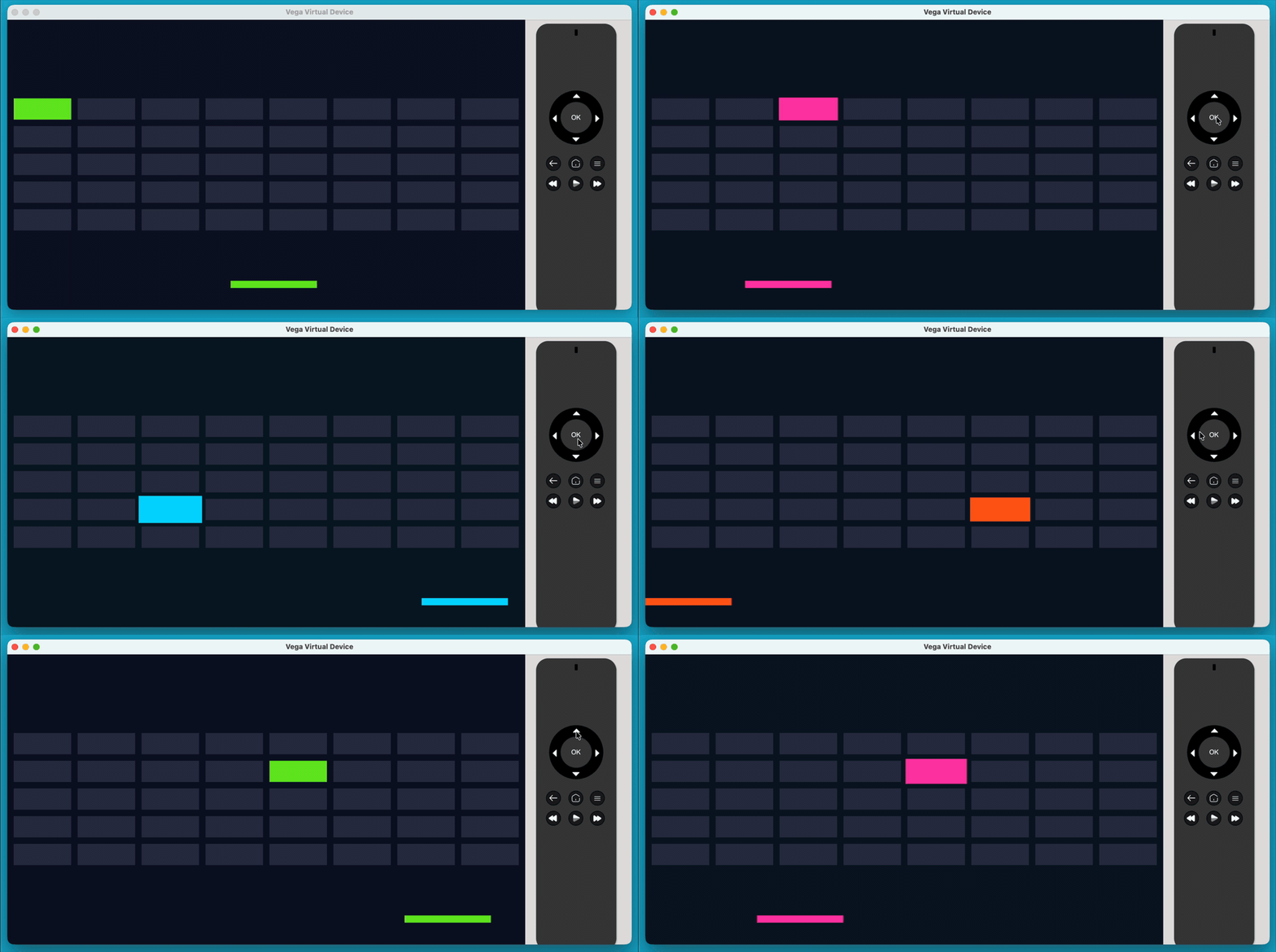
But a grid of colored rectangles is not an app, and nobody wants to rebuild text rendering, layout and focus handling from scratch.
So I tried the next step…
Iteration: Porting Qt
The first experiment might look simple, and it is. Building a real app this way, drawing every pixel on top of the graphics API, would be a painful process. But that was never the point. The important part is that it opens the door: if the platform gives you a window, a GPU context and key events, that is exactly what a cross-platform UI framework needs to run.
That’s why I decided to give Qt a try. Some years ago I used it to build TV apps for several platforms, and it was a very positive experience.
Cross-platform frameworks usually come with compromises in terms of performance, but Qt was an exception. It is not as close to the platform as a fully native app in terms of components and layouts, yet the performance it offers is superb.
There is also a more practical reason. In contrast to React Native, Qt is really designed to be extended to new platforms. It has a documented way to do it, called the Qt Platform Abstraction, or QPA, and all the platform-specific code lives in a single plugin.
A QPA plugin tells Qt how to talk to the platform. I wrote a vega plugin where each piece maps to something we already used in the first experiment:
- A Qt window is a full-screen Vega window.
- Qt’s OpenGL context is a Vega GPU context and surface. Swapping buffers means presenting the surface and waiting until the frame has been shown.
- GL functions are resolved through the GPU device, same as before.
- Remote key events are forwarded into Qt’s event queue.
- Fonts are loaded with FreeType from the fonts already installed on the device, Amazon Ember included.
The Vega entry point stays the same as in the first experiment. The only difference is that onForeground now starts a QGuiApplication on its own thread and loads a QML file. And the QML is just normal QML: it does not know it is running on Vega at all.
Cross-compiling Qt
The QPA plugin turned out to be the easy part. Most of the time went into building Qt itself with the Vega SDK’s compiler.
That means building Qt twice: once for the Mac, to get the host tools that cross-compiling needs, and once for Vega. I went with a static build, so the whole of Qt ends up inside the app’s single library and there is nothing else to install on the device. And since the SDK has no OpenGL ES headers, I took the official Khronos headers and built a stub library to link against. On the device, the real driver is loaded instead.
Along the way, Qt hit a couple of corners of the SDK’s Clang 15 toolchain. Its hash code tried to use ARM AES instructions the toolchain does not enable, and for 32-bit devices some of Qt’s hand-written assembly uses GNU-only directives that Clang cannot assemble. One configure flag and a tiny patch later, both were gone.
The most interesting bug was in my own code. The app rendered fine, but closed as soon as you pressed any button. It turns out Vega does not keep its own reference to the key listener you give it, so passing a temporary object meant the listener was freed right after being registered. The first key press then called into freed memory. Keeping the listeners alive fixed it.
Result
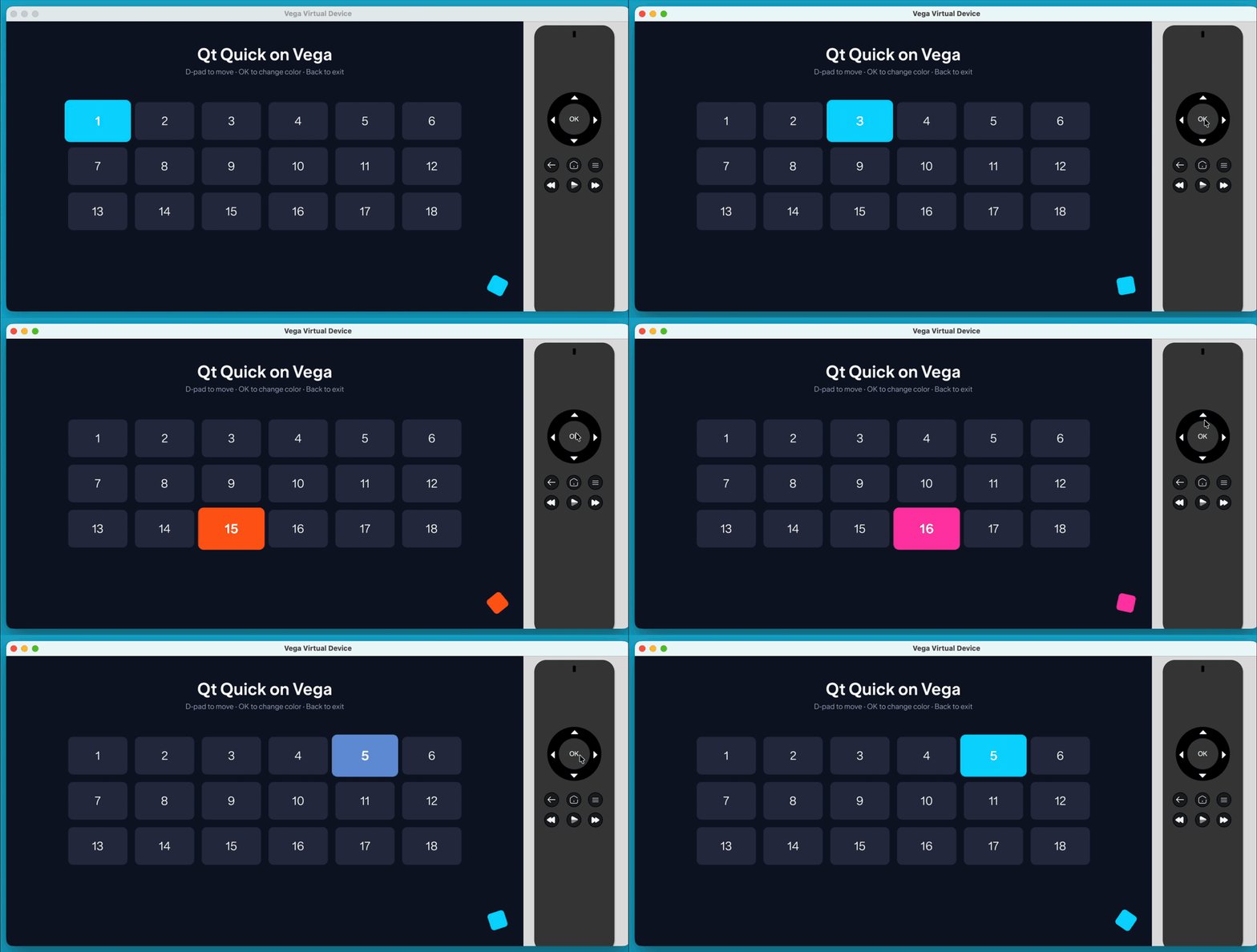
A plain Qt Quick screen, running on a 32-bit Fire TV Stick with 1 GB of RAM, rendering with OpenGL ES, with D-pad navigation and the Back button working. The whole package, Qt included, is 7.5 MB.
Show me the code
In the following repositories you can find the code for both the initial experiment and the Qt port:
Disclaimer: A word of caution
This is a proof of concept, not a complete port of Qt for Vega.
The app model it relies on is part of the SDK and comes with its own guides. Even so, Amazon’s app developer documentation still only covers React Native, so this is not a path Amazon promotes for building apps, and there is no guarantee it will keep working the same way in future OS updates. I also have no idea whether an app built this way would pass the Amazon Appstore review. Please do not take this as a recommendation to ship a production app this way.
To call this a real port of Qt for Vega, there is still a lot of work left. To name just the obvious parts:
- Moving to the background and back, and relaunching the app, are not handled yet.
- Startup time, memory usage and frame rate have not been measured.
- Only the D-pad, OK and Back keys are mapped. No media keys, text input or on-screen keyboard.
- No video playback was tested, which for a TV app is kind of the whole point.
- No HTTPS networking, no VoiceView accessibility, no localization.
- The app’s logs do not reach the device log yet, which makes debugging painful.
- The build is a collection of scripts, with no IDE integration or one-step deployment.
- Qt is linked statically, which comes with LGPL obligations for a real product.
What’s next
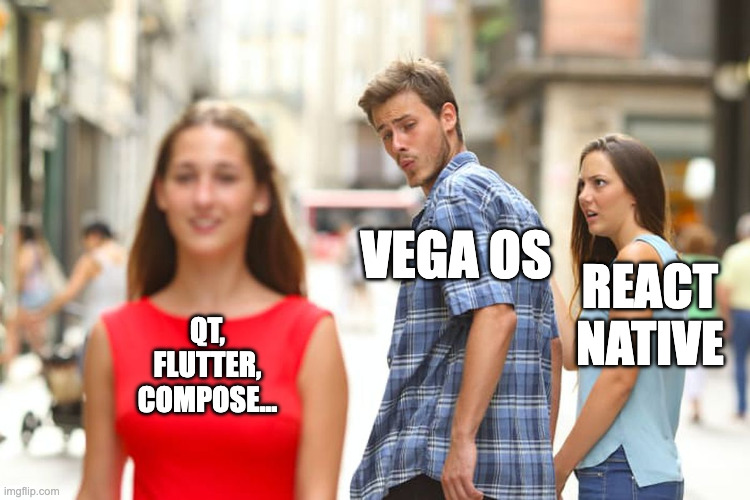
Qt was just one example. What made it possible is not anything specific to Qt, but the fact that Vega gives native code a window, an OpenGL ES context and input events. That is the same foundation other cross-platform frameworks are built on.
-
Flutter, for instance, has a documented embedder API meant precisely for bringing its engine to new platforms, and it is how Flutter already runs on embedded Linux devices and other TV platforms.
-
Compose Multiplatform, from the Kotlin Multiplatform world, draws its UI with Skia, which only needs a GL context to render into.
-
Other toolkits like Slint or Avalonia, and game-oriented options such as SDL or Godot, each render in their own way, but they all share the same basic requirement: a native window with an OpenGL ES surface and a source of input events.
None of them would be trivial to port, but none of them need React Native either.
Conclusion
React Native is the only way Amazon supports to build apps for Vega OS, but it is not the only way that works. Underneath the JavaScript there is a regular Linux system with a native app model, windows and an OpenGL ES GPU, and that is enough to run C++ directly or to bring a framework like Qt along.
Whether that is a good idea for a real product is a different question, and the answer depends much more on Amazon than on the code. But I have to say I was surprised by how little was really missing. With Amazon’s blessing and a bit more work, Vega could be a lot more open than it looks from the outside.